Showing posts with label apps. Show all posts

Friday, June 13, 2014

23 Mobile Things #22: Discovering Apps

Ah, "discovering apps." Because what I need after this program is more apps. ;) Unable to decide, I looked at both Quixey and Apps Gone Free. It was clear pretty soon in that while they're both intended to help you find new apps, they go about that in two different ways.

Quixey

Quixey greets you with a search box. If you can't think of what to put in it, it has sample searches to get you started, ranging from pretty general to pretty specific ("prepare for fishing"), or you can browse through several categories. You can also just take your chances and see what's trending. This is the site you want to visit when you know what you want—or at least have a general idea of what that would be—and need a better way to search for it than Apple. I thought the interface was attractive and pretty easy to navigate (although searching and browsing looked an awful lot alike), but after 21 Things worth of apps, I was having trouble thinking of anything new to get, so even with their sample searches, it was a bit hard to find anything I wanted to try. But I eventually thought to look at calendar/task apps and happily ran off with another two—Schedule Planner and Planner Plus—to try, in addition to the one I already use. Whee!

Apps Gone Free

Use this app when you're in the mood for spontaneity and surprise. I installed this app and looked at today's free apps. Nothing called. Okay, I was safe. I'd just look at yesterday's selection…well, one thing led to another, and I came out of that with a curious app called Strange Rain that just, um, rains in your device, accompanied by music and sometimes words, plus Spendbook, a finance tracking app for my iPhone that I'll probably use for three days and then forget about. This app promises to help me overload both my tablet and my phone with interesting but not terribly useful apps ("app glut"). But I'll have fun the entire time!

Thursday, June 12, 2014

23 Mobile Things #21: Free-for-all

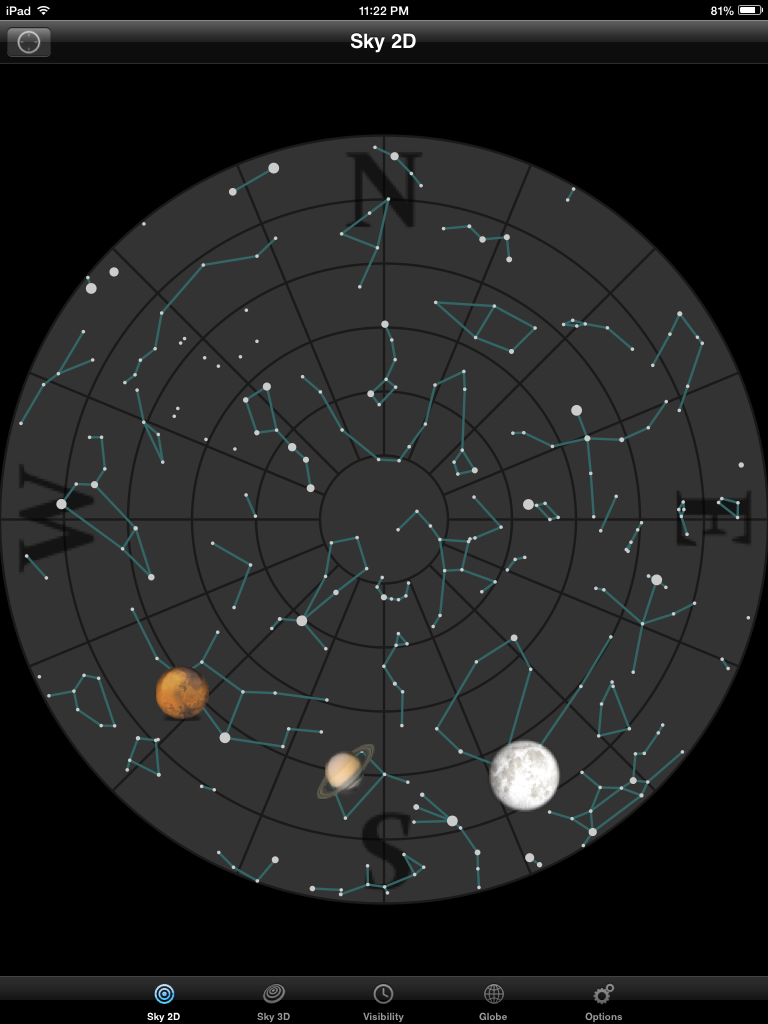
Okay, Planets may not be the most super-spiffy fantasticalest app ever, but it's pretty good for what it is: a introductory astronomy app. Planets' main feature is to show you the sky in 2D and 3D versions. In Sky 2D, you see the sky as it appears above you at your time and location. The planets above the horizon are shown against a background of constellations, and the moon is shown in whatever phase it's in.


It's the Sky 3D view where Planets really comes into its own. It starts out just showing you the 3D version of the 2D view, as seen facing south.


But then you can drag the view around to look in any direction, including below the horizon. Click the "Visibility" button in the upper right corner, and you'll see the sky as if you could see X-rays, microwave radiation, radio waves, gamma rays, or hydrogen ɑ (whatever that is).


You can also look at a chart of which planets are visible when, or see each planet close up and revolving (watch Venus and Uranus revolve east-to-west!).

The app doesn't explain much: you'll have to research the planets on your own (perhaps at your library!) to learn more about what it is you're seeing. But for some good interactive visuals about what the solar system looks like from here, Planets is a great introductory app.

Tuesday, June 10, 2014

23 Mobile Things #19: Hobbies

I figured this was a week to go off and find an app on my own. I just don't know enough about any of the hobbies for the suggested apps to know if the apps are any good or not. And since it had been a while since I'd looked for knitting apps, this seemed a good opportunity. I limited myself to free apps, since that's what we've been looking at so far, and I found a promising one called knitCompanion. (Which would work well for crochet too.)

For the past several years, I've been using PDF patterns rather than print copies. I've usually uploaded them to Evernote, which lets me write notes around my pattern and is available through all my devices and my desktop computer. But to annotate the pattern itself in Evernote, I'd have to subscribe to their premium service, which I wouldn't use enough to justify the expense. So I was happy to try a more knit-centric app.

I'm impressed by how much knitCompanion offers, even with the limited, free version. It connects to Dropbox, so that you can access patterns that aren't stored on your tablet to save space. There's a basic annotation ability: I can highlight text or add comments in a pop-up note. The highlighting is a bit awkward to do—I'd prefer just to swipe a finger along the desired text, but knitCompanion makes me shrink a box around it. But at least I can highlight text. (Take that, Evernote!) 

Those features are still pretty generic and would work for any PDF, but knitCompanion also had knitting-specific features. I was thrilled to see multiple knit counters, useful for when your pattern instructs you to "inc 1 st each end of every 4th row 18 times." The app lets you highlight the row you're working on, whether it's in a chart or written out. If you knit or crochet, you know how valuable this is. If you don't, let me just say that rows of pattern shorthand begin to look an awful lot alike after a while. I can see that upgrading would add more useful tools (and take away the ads), but unlike many free apps, this one isn't so limited as to be essentially useless. This app is definitely worth a closer look from knitters and crocheters.

Saturday, May 3, 2014

23 Mobile Things #11: Library & Reference

I've been using the St. Paul Public Library's mobile app for a few years now. It seems to have gotten a new color scheme in the past few days: nicer to look at aesthetically, and easier to read. I mainly use it for the catalog, to see if the library owns a specific book I want, usually one that I've thought of when I'm out and about and realize that I could pick up if it's available. The mobile catalog isn't designed for browsing; you can search by title or author, but that's it. I pulled up a record and clicked on one of its subject headings to see if that would take me anywhere, but no. One of the app's options is a button to take you to the main catalog, which is good, although that would be more useful on a tablet. On my phone, I could tell I was looking at the catalog, but it would have taken a lot of zooming in and out to make use of it (I'm feeling seasick at the very thought).

But, okay, for this Thing, I should probably look at all those other button in the app, the ones I usually don't use.
  • My Account: Indeed, that's what this is. Oh, and I can use this to renew the one book I have out. Nifty.
  • Library Locator: A good idea, especially if you're out and about and are struck by a need to visit the closest branch of the library. It needs to be tweaked for focus, though. It asked if it could use my location, then listed every branch, without any indication of which ones I was the closest to.
  • Ask A Librarian: Ooh, lots of options, and two of them ("Email Us" and "Call Us") can be done with just a click through my phone. Excellent! Too bad I don't have anything to ask a librarian right now, or I could test the system more thoroughly.
  • E-books and Audiobooks Available Now: OverDrive, 3M Cloud Library, and OneClickdigital, all there and ready for me to access them. You'd need to know exactly what book you want, or you'd drain your phone's battery scrolling through endless lists trying to find something, but if you do, this is a convenient way to pick up more reading material when you're away from home and your library.
  • New Books for Adults, Teens, Kids: Yes, that's what they are. Again, one can search the list rather than scroll.
  • BookLook @ ISBN search: This lets you scan the barcode of a book in a bookstore or that a friend is reading, or whatever, and tells you whether or not the library has it. A great idea, although the results can be confusing. I got a hit for the book I test-scanned, but then it said no copies were available and didn't let me reserve one. I'm guessing this means all the copies were lost or stolen. If that's the case, please don't get my hopes up by telling me the library owns the book.
  • Research: Databases. Got it.
  • Events & Classes: Exactly.
  • Metrowide Calendar: Events and classes at other Twin Cities libraries, I think.
  • Facebook Connect with us: Find them on Facebook...
  • Follow us on Twitter @stpaullibrary: ...and Twitter.
  • Metrowide Libraries: Locations of the branches of other Twin Cities libraries. Wait...it can tell me I'm 4.7 miles from the Hosmer Library (Hennepin County Library), but it can't tell me which branch of my own library is closest with the Library Locator?! Luckily, the St. Paul Public Library is listed here too, so now I can see which branch I'm currently closest to. Sheesh.
Lots of services in a fairly simple app. I really must use this more.

Sunday, February 9, 2014

23 Mobile Things #3: Utilities

Since I use the iPad and the iPhone differently, I decided to write about different apps for each of them. For two devices that have so much in common, there are many apps that are far more useful on the one than the other.

Something Old

I've had Google Search for probably almost the entire life of my iPad, and I use it, but it's never been the most successful app in the collection. For one thing, this is one of the slowest apps to boot. Tap the icon and it pops up instantly, but then leaves you staring at its splash screen for a noticeable length of time while it (presumably) gets everything ready for you. On top of that, its primary function is superfluous. You can easily search Google just by typing your search terms into the address bar in either Safari or Chrome, so why keep a separate app around just for searching?

The people at Google not being known for idiocy, they've no doubt figured all this out themselves, which is why this app is trying to become my personal assistant. (I have an iPad 2, so there'll be no competition from Siri.) I just switched on the Google Now feature two days ago to try it out. The problem is, my life is too boring for it. It has been eager for me to tell it to remind me to do something, like leave on time for an appointment—but I have nothing scheduled for the next six days. I don't follow sports, so it can't tell me my favorite teams' latest scores. I have no plans to fly anywhere in the foreseeable future, so upcoming flight departure times won't do me any good. Yes, it's telling me what the weather is like, but I have…oh, let's not count how many weather apps I have on the iPad. Suffice it to say I don't need Google to tell me that. The poor thing has been reduced to telling me that something I ordered has been shipped (it's been reading my email), and is hinting that I would get better suggestions if only I would turn on my Search History. I'm sure I would, but now we're into privacy concerns, and I don't know as I want my Search History on. I have this irrational need to apologize to this app for not letting it really show me how wonderful it could be.

Something New

My choice for the iPhone was RedLaser Barcode & QR Scanner. Even with my old phone, I'd been meaning to get a barcode/QR scanner, although I kept never getting around to it. Some utilities are more crucial than others, and a barcode scanner seems pretty high on the crucial list. I remember visiting the History Center a couple of years ago when they were having their "1968" exhibit, and you could get more information about the various displays by scanning their QR codes—except that I couldn't. :(

So anyway, new phone, new app. Sitting at my desk, I wanted to test the app. The first barcode at hand was on a ball of yarn.


I wasn't sure what I would get if I scanned it, since I wasn't asking the app to do anything. Would it even recognize the barcode as such?


Indeed it did. It figured out the yarn was from Berroco and what the UPC was, although that seems to be the extent of it. I'll spare you photos of the book I scanned next, but this was more successful: a photo of the cover art and a list of comparative prices around the Web. (Amazon.com noticeably absent from said list.) I am now resisting the urge to scan every barcode in the apartment. I don't need to know how much I overpaid for the box of cereal I'm currently enjoying.

Wednesday, January 22, 2014

23 Mobile Things #1: Blogging & Registering

Write a blog post for Thing 1 telling us what you hope to get out of the program, says the first prompt for this latest version of 23 Things on a Stick. Expanded horizons, I answer.

When I participated in the original version of this program, I was comfortable using computers, but I wasn't all that adventurous. I spent most of my time online doing basic web-surfing and email, and I still spent a lot of my computer time offline, working with Microsoft Word. I participated in a number of mailing lists and I had a wee bit of experience dealing with Usenet. I knew there were things like MySpace, Facebook, and Twitter in the world, but I wasn't sure what they were, and no one I knew used them, so there was nobody to ask. Oh, and the whole blogging thing: why would you write whatever came to mind and make it public—and why on earth would anyone be interested? What I got out of 23 Things on a Stick was encouragement to try all these things. It was difficult for me to play with something if I couldn't see a practical reason to do so, and the program itself was such a reason: play with this and tell everyone what you thought of it and what your experience was like. And although I almost never used it as such, I thought of it as a support group: if I had a problem with one of the Things, I could read other people's experiences of it and see if that helped.

In the end, what I got was a much bigger online world. I had been introduced to Facebook and Twitter, and I still participate actively on both today. Okay, it took a while to decide I liked Twitter, but no one said I had to adopt everything instantly, and I only managed to stay on the MySpace site for about two minutes before fleeing it forever. My mailing lists have been replaced with Facebook groups and friendships. I miss the in-depth discussions, but on the other hand, I feel as if I have a much better sense of the other members as people. And it turned out I liked blogging and ended up starting several different personal blogs—and as you can see, I never took this one down.

So what do I want from 23 Mobile Things? The same thing: a bigger world. I'm still not the most adventurous soul in the world, although I love my mobile toys (iPad and iPhone). I tend to look for variations on the apps I already have, and despite all of Apple's exhortations of There's an app for that! I rarely think to look for anything completely new to me. I'm hoping to be introduced to totally new apps, to apps that help me do what I still have to do on my desktop computer, and to apps that maybe I don't need but that my friends will find useful. And above all, I hope to learn really interesting things. (Or Things. Whatever.)